
elvex AI Integration: The Complete Enterprise Guide to AI Integration Tools 2026
Enterprise AI adoption is at a turning point. Companies in every industry are putting AI into their business functions, and many of those projects still fall short. In our experience, what separates the ones that work from the ones that don’t is rarely the AI itself. It’s whether the AI is connected to the business systems you already run.
That’s the job of enterprise AI integration tools like elvex. More and more companies are realizing that AI is only as useful as its connections. This guide covers what you need to know about elvex AI integration, from the basic ideas to detailed rollout plans, so you can get past integration problems and get real value out of AI.
What this guide covers:
- What enterprise AI integration is and why it matters
- How elvex handles the hard parts of integration
- Step-by-step rollout plans
- Use cases by industry
- Security and compliance best practices
- ROI and how to measure success
- Where AI integration is heading
What is Enterprise AI Integration?
Enterprise AI integration means connecting AI to the business systems, applications and data sources you already have, so work flows through one connected process. Integrated AI doesn’t sit off to the side as a separate tool. It works across your whole stack: CRM, ERP, data warehouses, communication tools and operational apps.
The Integration Challenge
This is a big problem. Integration is still the main thing holding back AI adoption, and most enterprise applications still work in silos. That gap creates bottlenecks that keep companies from getting what AI could do for them.
Without proper integration, AI can’t:
- Pull live data from several sources
- Take actions in different platforms
- Keep track of context across a business process
- Put insights in front of the people making decisions
- Grow past one-off proof-of-concept projects
What Enterprise AI Integration Tools Provide
Enterprise AI integration tools close the gap with:
Unified connectivity across many platforms and data sources
Automated workflows that remove manual data copying and cut errors
Real-time data synchronization so AI always works from current information
Secure authentication that protects sensitive business data in every integration
Scalable architecture that grows as your company does
Governance controls that keep you within compliance and security standards
Monitoring capabilities that track performance and catch problems
Types of AI Integration
Knowing the kinds of integration helps you plan:
Application-to-Application Integration: Connecting AI agents to business applications like CRM, ERP and productivity tools to automate workflows and data exchange.
Data Integration: Connecting AI to databases, data warehouses and data lakes so it can analyze and decide based on all the relevant information.
Process Integration: Building AI into the business processes you already have, from customer service to supply chain operations.
User Interface Integration: Putting AI agents inside tools people already use, like Slack, Microsoft Teams or email, so there’s less friction and more people use them.
API Integration: Connecting AI to custom and proprietary systems through application programming interfaces.
Why elvex Stands Out as an Enterprise AI Integration Platform
elvex has become a leader in enterprise AI integration by tackling the problems that sink most AI projects. It pairs capable AI agents with ready-made connections to popular business applications, so AI can actually do the work it promises.
Seamless Integration with your Existing Tech Stack
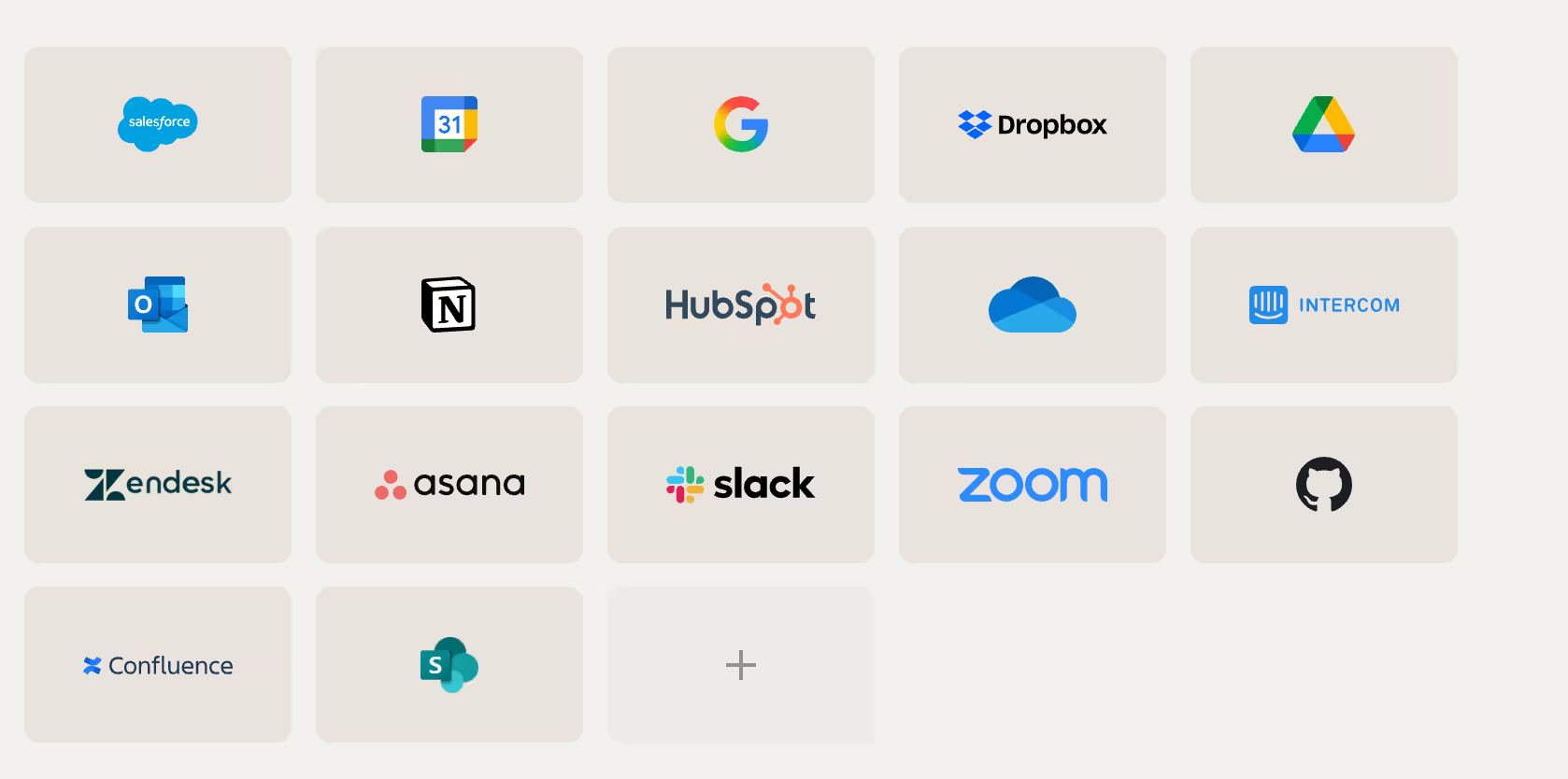
elvex comes with integrations for the tools your team uses every day. Microsoft Teams and Slack, Google Drive, Salesforce, Gmail: elvex connects to what you already have without heavy custom development.
That removes one of the biggest obstacles to AI adoption. Instead of spending months building custom integrations or juggling a pile of separate tools, you can have AI workflows running in minutes.
What sets it apart:
- 200+ pre-built connectors to popular business applications
- No-code setup that business users can do themselves
- Enterprise-grade reliability and uptime
- Automatic updates when connected systems change
- Support for both cloud and on-premise systems
Explore all available integrations →
Security-First Integration Architecture
Security worries slow down or stop a lot of AI integration projects. elvex deals with them through a full security framework:
OAuth Integration: Users connect with their own OAuth credentials, so the permissions they already have in each system carry over. AI agents follow the same access controls your company already set up.
Human-in-the-Loop Approvals: When an operation would write data to an outside system, elvex requires a person to approve it. They can edit it and check its quality before the AI’s change takes effect.
Granular Permission Controls: Administrators decide exactly what AI agents can and can’t access, which keeps you in line with security policies and regulations.
Live-Syncing Data: Connections to data sources are live, so nobody works from stale data, and security stays in place.
Audit Logging: Full visibility into every AI action and every data access, for compliance and troubleshooting.
Deep dive: elvex Security Architecture →
Database Connections for Enterprise-Scale Data
Besides application integrations, elvex connects directly to your company’s data warehouses. That matters for companies with a lot of data infrastructure: AI agents can query, analyze and act on what’s in your databases without hurting security or performance.
Supported databases include:
- Snowflake
- Google BigQuery
- PostgreSQL
- AWS Redshift
- Microsoft SQL Server
- MySQL
- Oracle Database
Connecting elvex to your data warehouse →
Agent-Based Architecture
Traditional integration platforms work differently. In elvex, each AI agent is set up with its own capabilities and permissions. That gives you:
Modularity: Specialized agents for different jobs instead of one giant system
Flexibility: Change one agent’s behavior without touching other integrations
Scalability: Run many agents across different teams and use cases
Governance: Control exactly what each agent can access and do
How elvex AI Integration Works: From Connection to Automation
Knowing how elvex integrations work makes it easier to plan a rollout. The setup is structured so that it stays easy to use while meeting enterprise requirements.
Step 1: Connecting Integrations to Your Organization
Before AI agents can use an integration, an administrator has to turn it on for the company. Doing this centrally keeps governance and security in one place while giving teams the tools they need.
Company administrators go to integration settings and turn on the applications the company needs. That could be productivity tools, CRM systems, project management platforms or custom applications specific to your business.
Administrators can:
- Turn specific integrations on or off for the whole company
- Set default permissions and access levels
- Choose authentication methods
- Set up approval workflows
- Define data retention policies
Setting up organization-level integrations →
Step 2: Configuring Agent-Level Integration Access
Once an integration is on for the company, each agent can be given its own integration permissions. This follows the principle of least privilege: each AI agent gets only the integrations it needs for its job.
In the Agent Builder, creators open the Actions tab and choose which integrations their agent can use. elvex lists every available integration with an action count, showing how many specific operations each one offers.
Configuration options:
- Turn on every action for an integration
- Pick specific actions only
- Set read-only or read-write permissions
- Require human-in-the-loop approval
- Decide how errors are handled
Configuring agent integration actions →
Step 3: Enabling Specific Actions
Integration access works at two levels. You can turn on every action for an integration with one toggle, or turn on only the actions that fit your agent’s purpose.
For example, a customer service agent might need to read customer records in your CRM but should never delete anything. A sales automation agent might need to create leads and update opportunities but has no business seeing financial records.
Turning on only what’s needed keeps things secure without limiting what the agent can do for its job. It also makes agents perform better, because they aren’t sorting through capabilities they don’t need.
Common action types:
- Read actions: Get records, search data, look up information
- Write actions: Create records, update fields, delete entries
- Execute actions: Trigger workflows, send notifications, run processes
- Query actions: Run reports, analyze data, produce insights
Step 4: Establishing Personal Connections
Each user connects to integrations with their own credentials. That way, when an AI agent acts for a user, it stays within that user’s existing permissions.
How you connect depends on the integration, but it usually means OAuth, an API key or another secure way of handling credentials. After that, the connection just works, with no need to sign in again each time.
Supported authentication methods:
- OAuth 2.0 (most common for SaaS applications)
- API keys and tokens
- Basic authentication
- Custom authentication schemes
- Single Sign-On (SSO) integration
Step 5: Deploying AI-Powered Workflows
Once integrations are set up and connected, AI agents can run multi-step workflows across several systems. In one conversation, an agent might pull customer information from Salesforce, check stock levels in an ERP system, send a Slack notification and update a project’s status in a management tool.
This is where AI stops being a novelty and starts multiplying what people get done, by automating tasks that used to mean manual work in several platforms.
Workflow capabilities:
- Multi-step processes across different systems
- Conditional logic based on the data retrieved
- Error handling and retries
- Steps run in parallel for speed
- Transaction rollback to protect data integrity
Key Integration Capabilities in elvex
elvex supports many kinds of integration, each aimed at a specific company need.
Communication Platform Integrations
Slack Integration: Put AI agents right in Slack channels so teams can use AI without leaving the tool they talk in all day. Agents can answer questions, start workflows and share information in live conversations.
Microsoft Teams Integration: Like Slack, the Teams integration brings AI agents into the place where work already happens, so people switch tools less and use AI more.
What you get:
- Direct messages with AI agents
- Agents deployed to channels
- File sharing and document access
- Notifications and alerts
- Workflows triggered from conversations
Productivity and Collaboration Tools
Google Drive Integration: AI agents can open, search and cite documents stored in Google Drive, which makes knowledge lookup and document-based workflows possible.
Notion: Read and create pages, databases and content in Notion workspaces for knowledge management and documentation.
Confluence: Read and search team documentation, wiki pages and shared content in Confluence.
Learn more: Notion AI Integration with elvex→
Capabilities include:
- Document search and retrieval
- Content summaries
- Writing and sending email
- Calendar management
- Organizing and tagging files
CRM and Sales Platforms
Salesforce Integration: Connect AI agents to customer data for automated lead qualification, opportunity management and customer service. Agents can look up account information, update records and kick off sales processes from a conversation.
HubSpot Integration: Automate marketing and sales work with AI that nurtures leads, manages contacts and tunes campaigns.
Common use cases:
- Lead qualification and scoring
- Contact enrichment and updates
- Opportunity tracking and forecasting
- Support ticket management
- Sales activity logging
Deep dive: Salesforce AI Integration with elvex→
Project Management and Collaboration
Asana Integration: Create, assign and track tasks automatically based on AI insights and conversations.
Jira Integration: Connect AI agents to development work for issue tracking, sprint planning and project management.
Monday.com Integration: Simplify work management with AI automation and data syncing.
Customer Support Platforms
Zendesk Integration: Automate creating, routing and resolving tickets with AI support agents.
Intercom Integration: Improve customer messaging with smart responses and workflow automation.
Custom Application Integrations
Beyond the pre-built connectors, elvex can integrate with custom applications. Companies with proprietary systems can bring AI to the tools only they use.
Integration methods:
- RESTful API connections
- Webhook triggers and responses
- Custom connector development
- Middleware integration
- Legacy system adapters
Database Integrations
elvex connects to the major database platforms, including:
Snowflake: Use the cloud data warehouse for analytics and reporting
Google BigQuery: Query very large datasets for AI insights
PostgreSQL: Work with open-source relational databases
AWS Redshift: Connect to Amazon’s data warehouse
With these connections, AI agents can run complex queries, produce reports and make decisions based on all the data your company has.
Database capabilities:
- Plain-language questions turned into SQL
- Live data retrieval
- Scheduled reports
- Data analysis and pattern detection
- Alerts on anomalies
Enterprise AI Integration Use Cases by Industry
Here’s how elvex integrations solve real business problems in different industries.
Financial Services
Compliance and Reporting: AI agents connected to regulatory databases and internal systems can automate compliance reports, watch transactions for suspicious activity and produce audit trails.
Customer Onboarding: Speed up KYC (Know Your Customer) by connecting identity verification services, document management systems and CRM platforms.
Portfolio Management: Connect AI agents to market data feeds, portfolio management systems and communication platforms for live insights and automated rebalancing recommendations.
Fraud Detection: Connect transaction systems, customer databases and analytics platforms to spot and flag possible fraud as it happens.
Real results: Embark’s AI transformation at scale →
Healthcare
Patient Data Integration: Connect AI agents to Electronic Health Records (EHR) systems, lab systems and imaging platforms so clinicians see the full patient picture.
Appointment Scheduling: Automate scheduling by connecting calendar systems, patient databases and communication platforms.
Claims Processing: Speed up insurance claims by connecting AI agents to billing systems, insurance databases and document management platforms.
Clinical Decision Support: Connect medical knowledge bases, patient records and diagnostic systems to give evidence-based recommendations.
Regulatory considerations:
- HIPAA compliance requirements
- Patient data privacy protections
- Audit logging and access controls
- Secure data transmission
Media and Advertising
Content Management: Connect AI agents to content libraries, digital asset management systems and publishing platforms to organize, tag and distribute media.
Advertising Intelligence: Connect advertising databases, campaign management tools and analytics platforms to track competitors’ ad spending, media placements and market trends.
Audience Analytics: Connect AI agents to audience data platforms, viewership metrics and engagement tracking to see how content performs and what audiences like.
Campaign Optimization: Connect media planning tools, ad networks and performance tracking to improve ad placement, budgets and campaign strategy across channels.
Case Study: McClatchy Media’s AI transformation →
Technology and Software
DevOps Automation: Connect AI agents to CI/CD pipelines, monitoring tools and incident management systems to automate deployments and troubleshooting.
Customer Onboarding: Connect CRM systems, documentation platforms and communication tools to get new customers set up faster.
Product Analytics: Connect AI agents to usage data, customer feedback systems and product management tools to find insights and decide which features come first.
Technical Support: Connect ticketing systems, knowledge bases and customer databases for smarter support.
Professional Services
Project Management: Connect AI agents to project management tools, time tracking systems and billing platforms to automate admin work.
Resource Allocation: Connect skills databases, project schedules and availability calendars to put the right people on each project.
Client Communication: Connect AI agents to CRM systems, email platforms and document repositories to make client work smoother.
Knowledge Management: Connect document management systems, expertise databases and collaboration platforms to capture what the company knows and share it.
{{integrations-page=“/snippet”}}
Human Resources and Employee Support
Recruitment Automation: Connect AI agents to applicant tracking systems, job boards and communication platforms to speed up hiring.
Employee Onboarding: Connect HRIS systems, IT provisioning tools and learning management platforms to automate new hire setup.
Benefits Administration: Connect AI agents to benefits platforms, payroll systems and employee databases to answer questions and handle requests.
Performance Management: Connect performance review systems, goal tracking tools and feedback platforms to support ongoing improvement.
Common HR workflows:
- Processing time-off requests
- Answering policy questions
- Helping with benefits enrollment
- Recommending training and development
- Updating employee data
elvex vs. Other Integration Approaches: Comparison Guide
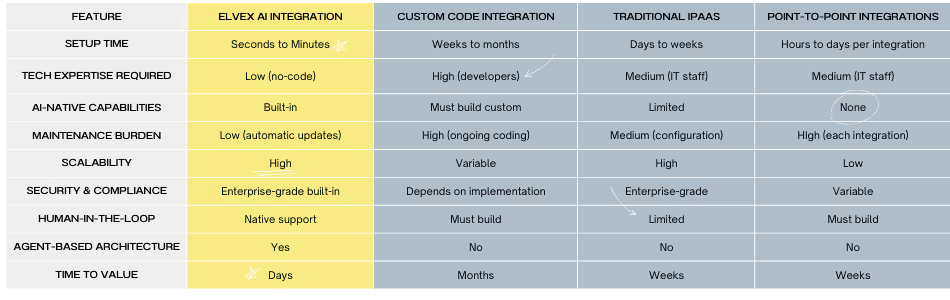
Here’s how elvex compares with other ways of integrating AI, to help you decide.
Comparison Table: Integration Approaches
When to Choose elvex
elvex is the best fit for companies that:
- Need AI workflows running quickly
- Want business users, not only IT, to build with AI
- Need enterprise-grade security without custom development
- Need AI connected to many systems
- Want to avoid the technical debt of custom code
- Need people to sign off on sensitive operations
- Need to roll AI out across departments
When to Consider Alternatives
Custom code integration may make sense for:
- Very specialized, one-of-a-kind integration needs
- Companies with large development teams
- Situations where total control comes first
- Very simple, single-purpose integrations
Traditional iPaaS may suit:
- Companies with no AI requirements
- Simple data syncing
- Connecting legacy systems without adding AI
Point-to-point integrations might work for:
- Very small companies with few integration needs
- Temporary or proof-of-concept projects
- Single-purpose connections
Best Practices for Enterprise AI Integration with elvex
Good AI integration takes planning and care. These practices help you get the most value with the least risk.
Start with Clear Business Objectives
Before you set up any integrations, name the specific business problems you’re solving. A vague goal like “use AI” leads to a scattered rollout. Aim for measurable results such as “reduce customer service response time by 40%” or “automate 60% of routine IT requests.”
Clear goals tell you which systems to connect, so you hook up what supports the goal instead of everything that’s available.
How to set objectives:
- Find the pain points in current processes
- Put a number on the impact (time, cost, quality)
- Define success metrics
- Rank by business value
- Set realistic timelines
Apply the Principle of Least Privilege
Turn on only the integrations and actions each agent actually needs. It’s a standard security practice that lowers risk, keeps agent behavior simpler and makes agents perform better.
Review integration permissions regularly and remove access that’s no longer needed as use cases change.
Permission review checklist:
- What data does this agent really need?
- What actions does it have to take?
- Who should have access to this agent?
- What approvals are required?
- How often should permissions be reviewed?
Design for Human Oversight
For workflows that change data or take significant actions, require a person to approve. That keeps quality under control and helps people trust the AI.
As the workflows prove reliable, you can relax oversight on routine operations and keep it for high-stakes decisions.
Where we recommend requiring approval:
- Financial transactions above a set amount
- Changes to customer data
- System configuration changes
- External messages sent on the company’s behalf
- Deleting records or data
Test Thoroughly Before Production Deployment
Use elvex’s agent testing tools to check integration workflows before real users see them. Test edge cases, error conditions and permission scenarios so the workflow holds up in practice.
Write down the expected behavior and create test cases you can rerun as integrations change.
Testing checklist:
- The normal, expected path
- Error handling and recovery
- Permission boundaries
- Performance under load
- Data validation and integrity
- User experience and clarity
- Security and compliance checks
Monitor and Optimize Continuously
Watch how AI agents use integrations and look for patterns that point to improvements. Track error rates, response times and user satisfaction.
Use what you learn to refine agent instructions, adjust integration settings and find more work to automate.
Metrics to watch:
- Integration success/failure rates
- Response time and latency
- User satisfaction scores
- Automation rate (tasks automated vs. manual)
- Cost per transaction
- Error types and frequency
Provide Clear Documentation and Training
Even with an easy interface, people do better with documentation that explains what the agents can do and how to work with them. Write guides with example requests, explain what each agent can do, and set realistic expectations.
Training gets people using AI sooner and cuts down on frustration from misunderstanding what an agent can do.
What to include:
- Quick start guides
- Example conversations and requests
- A reference of capabilities
- Troubleshooting guides
- FAQ sections
- Video tutorials
Establish Governance Frameworks
Write policies for how AI agents behave, what data they access and how integrations get used. Define how new integrations get approved, set security requirements, and make roles and responsibilities clear.
Governance stops one-off setups that create security or compliance problems, while still leaving room to try new things within sensible limits.
What a governance framework covers:
- How integrations get approved
- Security and compliance standards
- Data handling policies
- Roles and responsibilities
- Change management procedures
- Incident response protocols
Plan for Change Management
Whether new technology sticks depends on people as much as systems. Build a change management plan that covers:
Communication: Explain why you’re integrating AI and how it helps people
Training: Give thorough training on the new capabilities
Support: Keep helping people through the transition
Feedback: Give people a way to share what’s working and what isn’t
Champions: Find people in each department who are enthusiastic and give them what they need to bring others along
Start Small, Scale Strategically
Start with a pilot in one department or one use case. Learn from it before you expand.
How to scale:
- Pilot with one team/use case
- Measure results and gather feedback
- Refine based on what you learned
- Expand to similar use cases
- Roll out across the company
- Keep improving
This lowers risk and builds the company’s confidence and skill as you go.
Security and Compliance Framework
Security and compliance come first in enterprise AI integration. elvex is built to meet strict requirements.
Data Security Architecture
Encryption: All data is encrypted in transit (TLS 1.3) and at rest (AES-256) to keep out anyone who shouldn’t see it.
Network Security: Integration traffic travels over secure channels, with network isolation and firewall protection.
Access Controls: Role-based access control (RBAC) makes sure people can only reach the integrations and data they should.
Credential Management: Integration credentials are stored using industry-standard secret management.
Technical documentation: elvex Security Architecture →
Authentication and Authorization
OAuth 2.0: The industry-standard protocol for secure, delegated access to connected systems.
Single Sign-On (SSO): Works with enterprise identity providers (Okta, Azure AD, etc.) so sign-in is managed in one place.
Multi-Factor Authentication (MFA): An extra layer of security for sensitive operations.
Permission Inheritance: AI agents follow the permissions already set in the source systems, so access control stays consistent.
Compliance Capabilities
GDPR Compliance: Data residency options, right to deletion, data portability and consent management.
HIPAA Compliance: Business Associate Agreements (BAA), audit logging, access controls and encryption for healthcare data.
SOC 2 Type II: Regular audits and certifications covering security and availability controls.
Audit and Monitoring
Complete Logging: Every AI agent action, data access and integration call is logged for audits.
Real-Time Monitoring: Dashboards show integration health, performance and security events.
Alerting: Automatic notifications for security events, errors or unusual behavior.
Retention Policies: Log retention you can set to meet compliance requirements.
Data Governance
Data Classification: Tag and classify data by sensitivity so the right controls apply.
Data Lineage: Track how data moves between integrations to understand dependencies and effects.
Data Quality: Validation rules and quality checks to keep data accurate.
Data Retention: Policies for how long data is kept and when it’s deleted.
Incident Response
Detection: Automated monitoring spots possible security incidents.
Response: Written procedures for investigating and responding to incidents.
Remediation: Tools and processes to contain and fix security problems.
Communication: Rules for notifying affected parties and stakeholders.
ROI and Success Metrics for AI Integration
Measuring ROI and tracking success metrics is how you make sure AI integration is paying off.
Cost Considerations
Implementation Costs:
- elvex subscription fees (based on usage and features)
- Time for initial setup and configuration
- Training and change management
- Custom integration work (if needed)
Ongoing Costs:
- Monthly/annual subscription fees
- Time for maintenance and tuning
- More integrations as needs grow
- Support and training for new users
Cost Savings:
- Less manual work on repetitive tasks
- Processes finish faster
- Fewer errors to fix
- Less custom development
- Less integration maintenance
ROI Calculation Framework
Formula: ROI = (Total Benefits - Total Costs) / Total Costs × 100
Benefits to put a number on:
- Time saved on automated tasks (hours × hourly rate)
- Fewer errors (cost of errors × reduction percentage)
- Faster response times (effect on customer satisfaction)
- More capacity (additional work completed)
- Lower development costs (vs. custom integration)
Example calculation:
- Annual subscription cost: $50,000
- Implementation cost: $20,000
- Total first-year cost: $70,000
- Time saved: 2,000 hours × $50/hour = $100,000
- Error reduction savings: $30,000
- Total benefits: $130,000
- ROI: ($130,000 - $70,000) / $70,000 = 86%
Key Performance Indicators (KPIs)
Efficiency Metrics:
- Tasks automated per day/week/month
- Average time to complete processes (before vs. after)
- How often people have to step in manually
- Increase in processing capacity
Quality Metrics:
- Drop in error rate
- Improvement in data accuracy
- Consistency of outputs
- Compliance adherence rate
User Adoption Metrics:
- Active users of AI agents
- Queries per user per day
- User satisfaction scores
- Training completion rates
Business Impact Metrics:
- Customer satisfaction (CSAT, NPS)
- Revenue impact (sales cycle time, conversion rates)
- Cost per transaction
- Employee satisfaction and retention
Technical Metrics:
- Integration uptime and availability
- Response time and latency
- Error rates and types
- How well the system handles growth
Success Benchmarks by Use Case
Customer Service:
- 40-60% reduction in response time
- 30-50% reduction in ticket volume
- 20-30% improvement in CSAT scores
- 50-70% of routine queries automated
Sales Enablement:
- 20-30% reduction in sales cycle length
- 15-25% increase in conversion rates
- 40-60% reduction in administrative time
- 30-50% improvement in data accuracy
IT Service Management:
- 50-70% of routine requests automated
- 60-80% reduction in resolution time for common issues
- 30-40% reduction in ticket backlog
- 25-35% improvement in employee satisfaction
Data Analysis:
- 70-90% reduction in report generation time
- 50-70% increase in data accessibility
- 40-60% more insights generated
- 30-50% improvement in decision-making speed
Measuring Time to Value
Track how fast your company starts seeing benefits:
Phase 1 (Weeks 1-4): Initial setup and pilot deployment
- Metric: Time from purchase to first agent deployed
- Target: 2-4 weeks
Phase 2 (Weeks 5-12): Tuning and expanding the pilot
- Metric: Time to reach 50% of the target automation rate
- Target: 8-12 weeks
Phase 3 (Weeks 13-26): Full deployment and scaling
- Metric: Time to full company rollout
- Target: 6 months
Phase 4 (Ongoing): Continuous improvement
- Metric: Quarterly improvement in key metrics
- Target: 10-20% improvement per quarter
Overcoming Common Enterprise AI Integration Challenges
Even with a strong platform like elvex, companies run into problems during AI integration. Knowing them ahead of time, and how to fix them, gets you to results faster.
Challenge: Data Silos and Inconsistent Formats
The Problem: Company data often lives in many systems with different formats, schemas and quality. AI agents struggle when the customer record in your CRM doesn’t match the one in your ERP.
The Solution: Set data governance standards for the most important data. Use elvex integrations to build combined views that reconcile differences between systems. Start with high-value data such as customer information, then move on to other areas.
Action steps:
- Audit current data sources and find inconsistencies
- Define a master data management strategy
- Add data quality rules to elvex integrations
- Write transformation logic to standardize formats
- Keep monitoring data quality metrics
Challenge: Legacy System Limitations
The Problem: Older systems may not have modern APIs or integration options, which makes them hard to connect to AI platforms.
The Solution: elvex’s database integrations can often reach legacy systems through their underlying databases, even when there’s no application-level API. For systems without database access, consider middleware that exposes legacy functions through modern interfaces.
Strategies:
- Direct database connections for read access
- Middleware or API gateways for write operations
- Screen scraping for systems with no other way in
- Gradual migration to modern alternatives
- A mix of several methods
Challenge: Security and Compliance Concerns
The Problem: Regulations and security policies may limit how AI can access and use certain data.
The Solution: Use elvex’s OAuth integration and permission inheritance so AI works inside your existing security rules. Require human approval for sensitive operations. Bring compliance teams into planning early so their concerns get handled before they hold things up.
Best practices:
- Do a security assessment before rollout
- Document data flows and access patterns
- Use role-based access controls
- Turn on audit logging for every AI action
- Review compliance regularly
Challenge: User Adoption and Change Management
The Problem: Employees may push back on AI workflows and stick with the manual processes they know.
The Solution: Start with use cases that clearly take away frustration rather than replace jobs. Involve the people who’ll use the agents in designing them, and build in their feedback so the tools actually help. Celebrate early wins and share success stories to build momentum.
Adoption strategies:
- Find a champion in each department and give them support
- Provide thorough training and support
- Explain the benefits clearly and often
- Start with problems people want solved
- Collect feedback and act on it
- Recognize and reward early adopters
Challenge: Integration Maintenance and Updates
The Problem: Outside systems change their APIs, which breaks integrations and means ongoing maintenance.
The Solution: elvex handles many integration updates automatically, but you should still have a process for watching integration health and responding to problems. Sign up for update notices from the platforms you connect, and test changes outside production before users see them.
Maintenance framework:
- Automated monitoring and alerts
- Regular health checks and testing
- Staged rollout of updates
- Rollback procedures for problems
- Documentation of customizations
- Channels for talking to vendors
Challenge: Scaling Across the Organization
The Problem: What works in a pilot may not work across the whole company.
The Solution: Plan for scale from the start. Build agents and integrations so they can be reused. Set up governance that can handle growth. Use elvex’s agent templates and configuration management to roll out the same way across teams.
Scaling considerations:
- Performance under heavier load
- Governance and approval workflows
- Capacity for training and support
- Managing costs as usage grows
- Organizational change management
- Whether the technical design can grow
Challenge: Measuring and Demonstrating Value
The Problem: If you can’t put numbers on what AI integration is doing, support and budget can dry up.
The Solution: Set clear metrics before rollout and track them consistently. Use elvex’s analytics and reporting to show value. Share success stories and hard numbers with stakeholders regularly.
How to measure:
- Record baseline metrics before rollout
- Track leading and lagging indicators
- Build executive dashboards
- Write up case studies and testimonials
- Calculate ROI and share it
- Tie results to business goals
The Future of Enterprise AI Integration
AI integration is changing quickly. Knowing where it’s heading helps you prepare.
Agentic AI and Autonomous Workflows
AI systems are moving past simple request and response toward working on their own. Agentic AI spots opportunities without being asked and runs multi-step workflows with no one stepping in.
What’s coming:
- Finding and fixing problems before anyone reports them
- Workflows that improve themselves over time
- Several agents working together on complex tasks
- Autonomous decisions within set limits
- Automation that anticipates needs based on patterns
elvex is built for this shift, with integrations that let agents run complex processes across many systems on their own.
Standardization Through Integration Protocols
The industry is settling on common ways to integrate AI, which cuts complexity and helps platforms work together. Standards will make it easier to connect AI to the infrastructure you already have.
Emerging standards:
- Model Context Protocol (MCP) for AI integration
- OpenAPI specifications for consistent API design
- Industry-specific data exchange standards
- Security and authentication protocols
- Governance and compliance frameworks
Increased Emphasis on Data Integration
Companies increasingly see that AI agents only succeed when they’re connected to company data. That’s driving investment in integration platforms that give one way into CRM, ERP, data lakes and other core systems.
Because elvex combines application integrations with database connections, it’s well placed for this: AI agents get the broad data access they need to be useful.
Data integration trends:
- Live data streaming and processing
- Unified data fabrics across systems
- Data mesh designs for decentralized access
- Better data quality and governance
- Integration techniques that protect privacy
Low-Code and No-Code Integration Tools
As AI spreads through companies, integration tools are getting easier for non-technical people to use. elvex’s visual setup and pre-built connectors are an example: business users can build AI workflows without much coding.
Why this matters:
- Value arrives sooner
- IT is less of a bottleneck
- Business users can build for themselves
- More new ideas get tried
- Lower total cost of ownership
AI-Powered Integration Management
Integration platforms will use AI to run themselves better: catching problems automatically, suggesting improvements and adjusting to change. Using AI to manage AI integrations will make them more efficient and reliable.
Self-tuning capabilities:
- Automatic error detection and fixes
- Recommendations to improve performance
- Predictive maintenance for integrations
- Smart routing and load balancing
- Anomaly detection and alerts
Vertical-Specific Integration Solutions
As AI integration matures, we’ll see products built for the specific needs and workflows of healthcare, financial services, manufacturing and other industries.
Industry specialization:
- Pre-configured agents for common use cases
- Compliance and security specific to each industry
- Industry data models and schemas
- Specialized connectors for industry systems
- Best practice templates and frameworks
Edge AI and Distributed Integration
Integration will reach past cloud systems to edge devices and distributed systems, putting AI closer to where data is created and decisions are made.
Edge integration scenarios:
- Manufacturing floor automation
- Smarter retail point of sale
- Decision support at the hospital bedside
- Field service
- Coordinating IoT devices
Frequently Asked Questions (FAQ)
General Questions
What is AI integration?
AI integration is connecting AI systems to your existing business applications, databases and workflows, so AI agents can get data, take actions and automate processes across your stack.
Why is integration important for AI success?
Without integration, AI works in isolation. It can’t reach the data it needs or act in the systems where work happens. Integration turns AI from a standalone tool into part of how the business runs.
How is elvex different from other integration platforms?
elvex is built specifically for AI integration, with an agent-based architecture, 200+ pre-built connectors plus 2,000+ more applications you can connect through MCP, no-code setup and enterprise-grade security. Traditional integration platforms weren’t designed for AI workflows. elvex was, and includes features like human-in-the-loop approvals and plain-language interaction.
Do I need technical skills to use elvex?
No. elvex is designed for business users and is set up without code. Technical skills help with advanced customization, but business users with some training can handle most integration tasks.
How long does it take to implement elvex?
Initial setup takes days, and pilots are usually running within 2-4 weeks. A full company rollout usually takes 2-3 months, depending on scope and complexity.
Integration Questions
What systems can elvex integrate with?
elvex has 200+ pre-built connectors, including Salesforce, Microsoft 365, Google Workspace, Slack, Zendesk and the major database platforms, and you can connect 2,000+ more applications through MCP. Custom integrations can be built for proprietary systems.
Can elvex integrate with legacy systems?
Yes. elvex can reach legacy systems through database integrations, APIs (where they exist) or middleware. Many companies have connected AI to systems that are decades old.
How do I connect elvex to my database?
elvex connects directly to major database platforms including Snowflake, BigQuery, PostgreSQL, Redshift and SQL Server. Setup usually means entering connection credentials and choosing which tables/views to make available.
Tutorial: Database connection setup →
Can integrations write data back to my systems?
Yes. elvex integrations can both read and write. You choose which actions are allowed and can require human approval for sensitive writes.
What happens if an integrated system changes its API?
elvex updates its pre-built integrations automatically. You’ll be told about any change that could affect your agents, and you can test updates before they reach production.
Security and Compliance Questions
How does elvex ensure data security?
elvex uses encryption in transit and at rest, OAuth authentication, role-based access controls, audit logging and other enterprise-grade security measures. Every integration follows the permissions already set in the source systems.
Is elvex compliant with GDPR, HIPAA, and other regulations?
Yes. elvex supports GDPR, HIPAA, SOC 2, and other compliance frameworks. Review your specific compliance requirements with your security and legal teams.
Who can access data through elvex integrations?
Only people with the right permissions. elvex uses OAuth so AI agents act within each user’s existing permissions in the connected systems.
Can I control what AI agents are allowed to do?
Yes. Administrators control which integrations each agent can use and which actions it can take. You can require human approval for sensitive operations.
How long is data retained in elvex?
You set the data retention policy. elvex can keep data for audits or delete it right after processing.
Conclusion: Integration is the Foundation of AI Success
Enterprise AI can do a great deal, but not without solid integration. As companies work through the hard parts of adopting AI, platforms like elvex provide the integration infrastructure that turns AI from an experiment into something the business depends on.
By connecting AI agents to the systems where work actually happens, elvex lets companies automate workflows, open up data to more people and extend what their people can do across the whole company. Its security-first design, large connector library and flexible architecture address the integration problems that sink most AI projects.
What to take away from this guide:
✅ Integration is essential: AI can’t deliver value cut off from business systems
✅ elvex makes it simpler: Pre-built connectors and no-code setup speed up rollout
✅ Security is built in: Enterprise-grade security and compliance protect your data
✅ Start with a plan: Begin with clear goals and high-value use cases
✅ Scale step by step: Pilot, learn, refine, then expand across the company
✅ Keep measuring: Track metrics to show value and decide what to improve
✅ Plan ahead: AI integration will keep changing and expanding
The integration market is growing fast, and companies increasingly see integration as essential to AI success. The ones that get integration right will have a real edge. The question isn’t whether to invest in enterprise AI integration. It’s how fast you can put it in place.
elvex is a proven platform that turns integration complexity into an advantage. Whether you’re just starting with AI or scaling up what you already have, elvex’s integrations give you a secure, lasting base for AI that works.
Your next steps:
- Review your current integration problems and opportunities
- Pick high-value use cases for AI integration
- Explore elvex and its available integrations
- Build a business case and rollout plan
- Start with a pilot to prove value
- Expand what works across the company
Want to get more out of enterprise AI? Explore elvex integrations and see what connected AI can do.